
Python List in Hindi (2026) – List क्या है?
Table of Contents
Toggle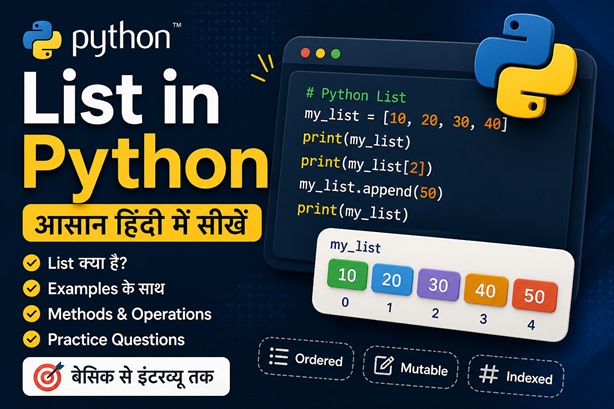
Python में List एक ordered और mutable data structure है, जिसका उपयोग multiple values को एक साथ store करने के लिए किया जाता है। अगर आप जानना चाहते हैं list kya hai, list ka use और list methods, तो यह beginner-friendly guide आपके लिए है।
👉 List = Ordered + Mutable
👉 Syntax: [1, 2, 3]
👉 Supports indexing, slicing & methods
अब Python List को examples के साथ समझें 🚀
Start LearningPython में List क्या है? (What is List in Python in Hindi)
Python में List एक ordered और mutable data structure है, जिसमें हम multiple values को एक ही variable में store कर सकते हैं। List के elements को index के जरिए access किया जाता है और इसे आसानी से modify (add, update, delete) किया जा सकता है।
# List बनाना
numbers = [10, 20, 30, 40]

# Mixed data list
data = ["Python", 100, 3.5, True]
💡 Example: List का उपयोग
fruits = ["apple", "banana", "mango"]

# पहला element access करना
print(fruits[0])

# नया element add करना
fruits.append("orange")

print(fruits)
Python List Methods in Hindi (append, insert, remove, pop, sort, reverse)
Python में List methods का उपयोग list के data को manage करने के लिए किया जाता है। जैसे element add करना, delete करना, sort करना आदि। नीचे सभी important methods examples और output के साथ दिए गए हैं।
fruits = ["apple", "banana"]
fruits.append("mango")
print(fruits)

# Output: ['apple', 'banana', 'mango']
nums = [1, 2, 3]
nums.insert(1, 10)
print(nums)

# Output: [1, 10, 2, 3]
nums = [1, 2, 3, 2]
nums.remove(2)
print(nums)

# Output: [1, 3, 2]
nums = [1, 2, 3]
nums.pop()
print(nums)

# Output: [1, 2]
nums = [3, 1, 2]
nums.sort()
print(nums)

# Output: [1, 2, 3]
nums = [1, 2, 3]
nums.reverse()
print(nums)

# Output: [3, 2, 1]
⚠️ Common Mistakes
# ❌ Mistake: remove vs pop confusion
nums = [1, 2, 3]

nums.remove(1)   # removes value
nums.pop()       # removes last element

# ❌ Mistake: sort() returns None
nums = [3, 2, 1]
result = nums.sort()
print(result)   # Output: None
🎯 Interview Tips
👉 append() और insert() में difference पूछा जाता है
👉 remove() vs pop() common interview question है
👉 sort() और sorted() का difference भी important है
⚡ Quick Summary
👉 append() = add at end
👉 insert() = add at index
👉 remove() = remove value
👉 pop() = remove last/index
👉 sort() = arrange list
👉 reverse() = reverse list
अब indexing और slicing सीखें 🚀
Next: IndexingPython List के Features (Mutable, Ordered, Indexed, Duplicates)
Python में List एक powerful data structure है जिसमें कई important features होते हैं। ये features List को flexible और dynamic बनाते हैं।
nums = [1, 2, 3]
nums[0] = 10
print(nums)

# Output: [10, 2, 3]
data = ["A", "B", "C"]
print(data[1])

# Output: B
items = ["x", "y", "z"]
print(items[0])

# Output: x
nums = [1, 2, 2, 3]
print(nums)

# Output: [1, 2, 2, 3]
⚡ Advanced Insight
👉 List dynamic memory allocation use करती है
👉 इसलिए यह flexible होती है लेकिन tuple से थोड़ी slower होती है
👉 Mutable होने के कारण debugging में ध्यान रखना पड़ता है
⚠️ Common Mistake
nums = [1, 2, 3]

# ❌ Wrong assumption
copy_nums = nums
copy_nums[0] = 100

print(nums)

# Output: [100, 2, 3]
# Reason: both variables refer to same list
💡 Quick Summary
👉 List = Ordered + Mutable + Indexed + Duplicates allowed
👉 Best for dynamic and frequently changing data
अब indexing और slicing सीखें 🚀
Next: Indexing & SlicingPython List Methods in Hindi (append, insert, remove, pop, sort, reverse)
Python में List methods का उपयोग list को modify करने के लिए किया जाता है। नीचे सबसे important methods दिए गए हैं जो interviews और real projects में काम आते हैं।
fruits = ["apple", "banana"]
fruits.append("mango")
print(fruits)
# ['apple', 'banana', 'mango']
nums = [1, 2, 3]
nums.insert(1, 10)
print(nums)
# [1, 10, 2, 3]
nums = [1, 2, 3, 2]
nums.remove(2)
print(nums)
# [1, 3, 2]
nums = [1, 2, 3]
nums.pop()
print(nums)
# [1, 2]
nums = [3, 1, 2]
nums.sort()
print(nums)
# [1, 2, 3]
nums = [1, 2, 3]
nums.reverse()
print(nums)
# [3, 2, 1]
⚡ Quick Summary
👉 append() = add at end
👉 insert() = add at position
👉 remove() = remove value
👉 pop() = remove last/index
👉 sort() = arrange data
👉 reverse() = reverse list
अब List indexing और slicing सीखें 🚀
Next: Indexing & SlicingPython List Indexing & Slicing in Hindi
Python में List indexing और slicing का उपयोग list के elements को access करने के लिए किया जाता है। Indexing से हम single element निकालते हैं और slicing से multiple elements।
my_list = [10, 20, 30, 40]

print(my_list[0])   # 10 (first element)
print(my_list[2])   # 30
print(my_list[-1])  # 40 (last element)
my_list = [10, 20, 30, 40, 50]

print(my_list[1:3])   # [20, 30]
print(my_list[:3])    # [10, 20, 30]
print(my_list[2:])    # [30, 40, 50]
print(my_list[::-1])  # reverse list
💡 Quick Summary
👉 Indexing = single value access
👉 Slicing = multiple values access
👉 Example: my_list[0], my_list[1:3]
अब real-life examples देखें 🚀
Next: ExamplesPython List के Real-Life Examples (Hindi)
Python List का उपयोग real life और projects में बहुत common है। नीचे practical examples दिए गए हैं जिससे आपको समझ आएगा कि List कहाँ और कैसे use होती है।
shopping = ["milk", "bread", "eggs"]

shopping.append("butter")
print(shopping)

# Output: ['milk', 'bread', 'eggs', 'butter']
marks = [85, 90, 78]

marks.append(88)
print(marks)

# Output: [85, 90, 78, 88]
tasks = ["study", "exercise", "coding"]

tasks.remove("exercise")
print(tasks)

# Output: ['study', 'coding']
employees = ["Rahul", "Aman", "Neha"]

employees.append("Priya")
print(employees)

# Output: ['Rahul', 'Aman', 'Neha', 'Priya']
⚡ Real Project Insight
👉 Lists का use dashboards, data analysis और web apps में होता है
👉 APIs से आने वाला data अक्सर list format में होता है
👉 Machine learning में dataset भी list/array के रूप में आता है
⚠️ Common Mistake
tasks = ["study", "exercise", "coding"]

# ❌ Wrong (value not present)
tasks.remove("gym")

# Error: ValueError
💡 Summary
👉 List = real-world data storage tool
👉 Dynamic data handling के लिए best choice
अब practice questions solve करें 🚀
Next: Practice QuestionsPython List vs Tuple in Hindi (Difference)
Python में List और Tuple दोनों data structures हैं, लेकिन इनके बीच कुछ important differences होते हैं। नीचे table में आसान तरीके से difference समझें।
| Feature | List | Tuple |
|---|---|---|
| Mutability | Mutable (change हो सकती है) | Immutable (change नहीं होती) |
| Syntax | [ ] | ( ) |
| Performance | Normal | Faster |
| Use Case | Dynamic data | Fixed data |
⚡ Quick Tip
👉 अगर data change करना है → List use करें
👉 अगर data fixed रखना है → Tuple use करें
पूरा comparison (List, Tuple, Set, Dictionary) देखें 🚀
Full Difference GuidePython List Practice Questions in Hindi
नीचे दिए गए practice questions से आप अपने Python List concepts को strong बना सकते हैं। पहले खुद solve करें, फिर answers check करें।
👉 Show Answers
# Q1
nums = [1, 2]
nums.append(3)

# Q2
nums.remove(2)
# या
nums.pop()

# Q3
nums[0]

# Q4
nums.reverse()

# Q5
nums = list(set(nums))

# Q6
nums.sort()
🔥 Concepts clear? अब quiz attempt करें 🚀
Start QuizPython List FAQ in Hindi (Common Questions)
यहाँ Python List से जुड़े सबसे common सवालों के आसान हिंदी में जवाब दिए गए हैं। ये questions beginners और interview दोनों के लिए useful हैं।
Q1. Python में List क्या है?
Python में List एक ordered और mutable data structure है, जिसमें multiple values को एक साथ store किया जा सकता है।
Q2. List mutable क्यों होती है?
List mutable होती है क्योंकि इसके elements को change, add या remove किया जा सकता है।
Q3. List और Tuple में क्या difference है?
List mutable होती है जबकि Tuple immutable होती है। List dynamic data के लिए और Tuple fixed data के लिए use होती है।
Q4. List में indexing कैसे काम करती है?
List का पहला element index 0 से शुरू होता है और negative indexing से last element access कर सकते हैं।
Q5. List में duplicate values allowed हैं?
हाँ, List duplicate values को allow करती है।
Q6. List को sort कैसे करते हैं?
List को sort करने के लिए sort() method का उपयोग किया जाता है।
Q7. List और Set में क्या अंतर है?
List ordered होती है और duplicates allow करती है, जबकि Set unordered होता है और duplicates remove कर देता है।
🎯 अब Quiz attempt करें और अपनी तैयारी check करें
Go to QuizPython List MCQ Quiz (Test Your Knowledge)
नीचे दिए गए MCQs solve करें और अंत में अपना score check करें 🎯