
Python Dictionary in Hindi – Dictionary क्या है?
Table of Contents
Toggle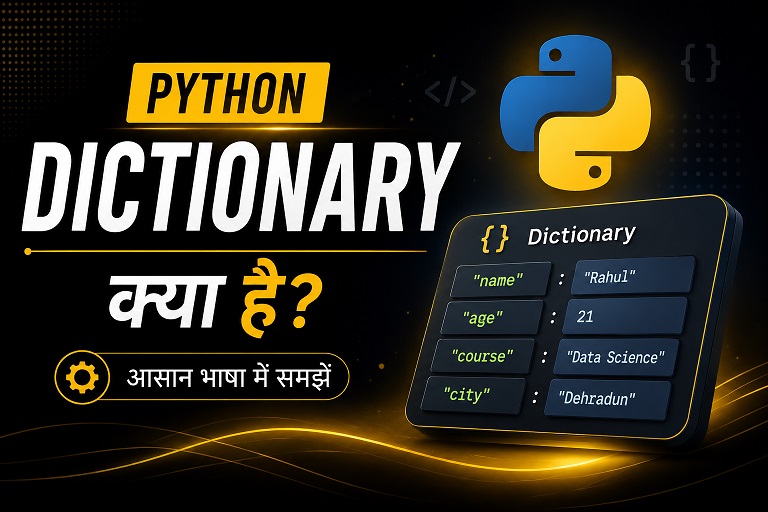
Python Dictionary एक powerful data structure है जो data को Key-Value Pair में store करता है। अगर आप Python, Data Analytics या Machine Learning सीख रहे हैं, तो Dictionary समझना बहुत जरूरी है।
इस ब्लॉग में आप क्या सीखेंगे?
✔ Dictionary Syntax
✔ Dictionary Methods
✔ Loop in Dictionary
✔ Nested Dictionary
✔ Real-Life Examples
Python Dictionary क्या है?
Python Dictionary एक built-in data structure है जो data को Key-Value Pair में store करती है। इसमें हर value की एक unique key होती है जिसकी मदद से data को आसानी से access किया जाता है।
Python Dictionary Example
student = {
    "name": "Rahul",
    "age": 21,
    "city": "Dehradun"
}

print(student)
ऊपर दिए गए example में name, age और city keys हैं जबकि Rahul, 21 और Dehradun उनकी values हैं।
Python Dictionary का Syntax
Python में Dictionary को { Curly Braces } के अंदर लिखा जाता है। इसमें data key : value format में store होता है।
Basic Syntax Example
student = {
    "name": "Aman",
    "age": 22,
    "course": "Data Science"
}

print(student)
इस example में name, age और course keys हैं और उनके सामने values store हैं।
Python Dictionary से Data Access कैसे करें?
Python Dictionary में data को access करने के लिए key का उपयोग किया जाता है। हर key एक specific value को represent करती है जिससे data को आसानी से प्राप्त किया जा सकता है।
Dictionary Access Example
student = {
    "name": "Rahul",
    "age": 21,
    "city": "Dehradun"
}

print(student["name"])
print(student.get("city"))
ऊपर दिए गए example में हमने name और city key की मदद से data access किया है।
Dictionary में Data Add, Update और Delete कैसे करें?
Python Dictionary mutable होती है, यानी इसमें data को add, update और delete किया जा सकता है। यही कारण है कि Dictionary real-world applications में बहुत उपयोगी होती है।
Add, Update & Delete Example
student = {
    "name": "Rahul",
    "age": 21
}

# Add New Data
student["city"] = "Dehradun"

# Update Data
student["age"] = 22

# Delete Data
student.pop("name")

print(student)
ऊपर दिए गए example में हमने Dictionary में नया data add किया, existing value update की और unwanted data delete किया।
Python Dictionary Methods in Hindi
Python Dictionary में कई useful methods होते हैं जिनकी मदद से data को access, update, copy और remove किया जा सकता है। ये methods coding को आसान और fast बनाते हैं।
Dictionary Methods Example
student = {
    "name": "Aman",
    "age": 22,
    "city": "Delhi"
}

print(student.keys())
print(student.values())
print(student.items())
ऊपर दिए गए example में हमने Dictionary की keys, values और items को print किया है।
✔ values() → सभी values दिखाता है
✔ items() → key-value pair return करता है
✔ pop() → specific item delete करता है
✔ update() → Dictionary data update करता है
Nested Dictionary क्या है?
जब एक Dictionary के अंदर दूसरी Dictionary store की जाती है, उसे Nested Dictionary कहा जाता है। इसका उपयोग complex data को organize करने के लिए किया जाता है।
Nested Dictionary Example
students = {
    "student1": {
        "name": "Rahul",
        "marks": 85
    },

    "student2": {
        "name": "Aman",
        "marks": 92
    }
}

print(students["student1"]["name"])
ऊपर दिए गए example में एक Dictionary के अंदर multiple student dictionaries store की गई हैं।
Python Dictionary के Real-Life Use Cases
Python Dictionary का उपयोग real-world applications में बहुत ज्यादा होता है। इसकी fast data access capability और key-value structure इसे modern programming के लिए powerful बनाती है।
Python Dictionary और List में अंतर
Python में List और Dictionary दोनों important data structures हैं, लेकिन दोनों का उपयोग अलग-अलग purposes के लिए किया जाता है। List ordered data store करती है जबकि Dictionary data को key-value pair में store करती है।
# List Example
students = ["Rahul", "Aman", "Neha"]

# Dictionary Example
student = {
    "name": "Rahul",
    "age": 21
}
ऊपर दिए गए example में List ordered items store कर रही है, जबकि Dictionary key-value format में data store कर रही है।
Python Dictionary में होने वाली Common Errors
Python Dictionary का उपयोग करते समय beginners कई common mistakes करते हैं। इन errors को समझना जरूरी है ताकि coding के दौरान problems को जल्दी solve किया जा सके।
student = {
    "name": "Rahul"
}

print(student["age"])
ऊपर दिए गए code में age key मौजूद नहीं है, इसलिए Python KeyError देगा।
Python Dictionary Interview Questions in Hindi
अगर आप Python interview या Data Analytics interview की तैयारी कर रहे हैं, तो Dictionary से जुड़े questions बहुत important होते हैं। नीचे कुछ commonly asked interview questions दिए गए हैं।
Python Dictionary Practice Programs in Hindi
Python Dictionary को अच्छे से समझने के लिए practice programs करना बहुत जरूरी है। नीचे कुछ beginner-friendly programs दिए गए हैं जो आपकी coding skills improve करेंगे।
students = {
    "Rahul": 85,
    "Aman": 90,
    "Neha": 95
}

for name, marks in students.items():
    print(name, marks)
ऊपर दिए गए program में student names और marks को Dictionary में store करके loop की मदद से print किया गया है।
Python Dictionary in Hindi – Conclusion
Python Dictionary एक powerful और fast data structure है जो data को key-value pair में store करती है। इसका उपयोग Data Analytics, Web Development, Automation, APIs और Machine Learning projects में बड़े स्तर पर किया जाता है।
✔ Python Dictionary Basics
✔ Dictionary Methods
✔ Nested Dictionary
✔ Dictionary Loops
✔ Real-Life Examples
✔ Practice Programs
Python Dictionary MCQ Quiz in Hindi
सभी questions attempt करें और अंत में Submit Quiz button पर click करके अपना score देखें।
Index Only
Binary Format
None
{ }
[ ]
< >
values()
items()
append()
No
Sometimes
Only Integers