
Table of Contents
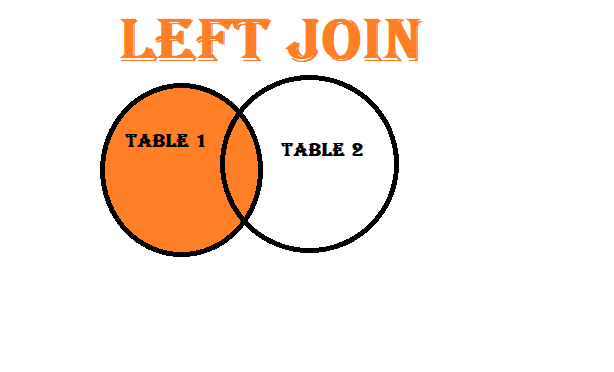
ToggleThe SQL LEFT JOIN is another type of join that combines data from two or more tables. Unlike an INNER JOIN, the LEFT JOIN retrieves all rows from the left table, and matching rows from the right table. If no match is found, NULL values are returned for the right table’s columns.
A LEFT JOIN (also known as a LEFT OUTER JOIN) returns all rows from the left table (in our case, the employees table), and the matched rows from the right table (the departments table). If there is no match, NULL values are shown for columns from the right table.
Example: A LEFT JOIN is useful when you want to find all employees, even those who don’t belong to any department.
SELECT table1.column_name, table2.column_name, ...
FROM table1
LEFT JOIN table2
ON table1.common_column = table2.common_column;
Let’s use the same tables: employees and departments, but this time we will perform a LEFT JOIN to retrieve all employees, even those without a matching department.
| EmployeeID | EmployeeName | DepartmentID | City |
|---|---|---|---|
| 1 | Rahul Sharma | 101 | Mumbai |
| 2 | Anjali Verma | 102 | Delhi |
| 3 | Karan Gupta | 103 | Bangalore |
| 4 | Priya Singh | NULL | Kolkata |
| DepartmentID | DepartmentName | HeadOffice |
|---|---|---|
| 101 | IT | Mumbai |
| 102 | HR | Delhi |
| 103 | Finance | Bangalore |
We can use the following LEFT JOIN query to fetch employee details along with their department:
SELECT employees.EmployeeID, employees.EmployeeName, employees.City, departments.DepartmentName, departments.HeadOffice
FROM employees
LEFT JOIN departments
ON employees.DepartmentID = departments.DepartmentID;
| EmployeeID | EmployeeName | City | DepartmentName | HeadOffice |
|---|---|---|---|---|
| 1 | Rahul Sharma | Mumbai | IT | Mumbai |
| 2 | Anjali Verma | Delhi | HR | Delhi |
| 3 | Karan Gupta | Bangalore | Finance | Bangalore |
| 4 | Priya Singh | Kolkata | NULL | NULL |
The query performed a LEFT JOIN between the employees and departments tables using the common column DepartmentID. The result includes all employees, and where a matching department is found, the department details are shown. If no match is found, NULL values are returned for the department-related columns.
Here’s what the output shows:
In conclusion, the SQL LEFT JOIN returns all rows from the left table, along with matching rows from the right table. If there’s no match, NULL values are returned for columns from the right table. It’s useful for finding all records in the left table, including those without matching records in the right table.