Table of Contents
ToggleThe SQL INNER JOIN is a powerful tool to combine data from two or more tables, and it is widely used in relational databases. In this blog, we’ll explore the concept of INNER JOIN with an example set in an Indian context, making it easier to understand and relate to real-world scenarios.
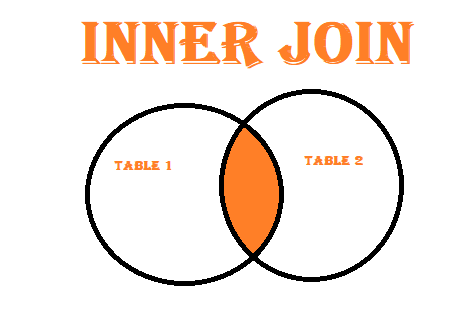
The INNER JOIN clause retrieves rows where there is a match in both tables based on a specified condition. If no match is found, the row is excluded from the result set. It’s ideal for fetching related data spread across multiple tables.
Example: Consider a table of employees and a table of departments. INNER JOIN can help you find which employee belongs to which department.
SELECT table1.column_name, table2.column_name, ...
FROM table1
INNER JOIN table2
ON table1.common_column = table2.common_column;
Let’s use an example where we have two tables: employees (representing employees of an Indian company) and departments (listing departments within the company).
| EmployeeID | EmployeeName | DepartmentID | City |
|---|---|---|---|
| 1 | Rahul Sharma | 101 | Mumbai |
| 2 | Anjali Verma | 102 | Delhi |
| 3 | Karan Gupta | 103 | Bangalore |
| 4 | Priya Singh | NULL | Kolkata |
| DepartmentID | DepartmentName | HeadOffice |
|---|---|---|
| 101 | IT | Mumbai |
| 102 | HR | Delhi |
| 103 | Finance | Bangalore |
We can use the following INNER JOIN query to fetch employee details along with their department:
SELECT employees.EmployeeID, employees.EmployeeName, employees.City, departments.DepartmentName, departments.HeadOffice
FROM employees
INNER JOIN departments
ON employees.DepartmentID = departments.DepartmentID;
| EmployeeID | EmployeeName | City | DepartmentName | HeadOffice |
|---|---|---|---|---|
| 1 | Rahul Sharma | Mumbai | IT | Mumbai |
| 2 | Anjali Verma | Delhi | HR | Delhi |
| 3 | Karan Gupta | Bangalore | Finance | Bangalore |
The query performed an INNER JOIN between the employees and departments tables using the common column DepartmentID. The result displayed only those employees who have a matching DepartmentID in the departments table.
Here’s what the output shows:
Note that Priya Singh does not appear in the result because her DepartmentID is NULL, meaning there is no matching record in the departments table. This is a key feature of INNER JOIN: it excludes rows where there’s no match in the second table.
In conclusion, the SQL INNER JOIN helps retrieve related data from multiple tables where the condition matches. In our example, we’ve used the DepartmentID to link the employees and departments tables. Remember that if there is no match, the row is excluded from the final result set.